How To Create UTM Tracking Links
Learn how to create UTM tracking and analyze performance in Google Analytics. Find out where your website traffic is coming from with UTM codes and GA4.


You’re running multiple marketing campaigns across email, social media, and analytics dashboards. Traffic is flowing in, but you have no idea which efforts actually work. When your boss asks, “Which campaign brought the most qualified leads?” you’re stuck guessing.
This is exactly why UTM tracking links exist.
UTM (Urchin Tracking Module) parameters transform vague traffic numbers into actionable business intelligence. They’re the difference between saying “we got some website visits” and confidently reporting “our email campaign generated 200 visits with 15% conversion, while Facebook ads brought 150 visitors averaging 3 minutes on site.”
Table of Contents
What is a UTM tracking link?
A UTM tracking link is a regular web URL that has been enhanced with special tracking parameters (called UTM parameters) to help marketers and analysts track the effectiveness of their campaigns and understand how users are finding their website.
UTM stands for “Urchin Tracking Module” (named after Urchin Software Corporation, which Google acquired and turned into Google Analytics). If you are as old as I am, you remember we used to have UA as parameters in the old Analytics. That’s where it comes from.
Here’s an example of how a UTM link looks:
https://example.com/product?utm_source=facebook&utm_medium=social&utm_campaign=spring_sale&utm_content=video_adWhen someone clicks this link, analytics tools like Google Analytics can track that the visit came from Facebook, through a social media post, as part of the spring sale campaign, specifically from a video ad. This data helps marketers understand which channels and campaigns are driving the most traffic and conversions, allowing them to optimize their marketing spend and strategy.
How does a UTM link look like?
A UTM link looks like a regular website URL with additional tracking parameters added after a question mark (?). Here are some examples:
Basic structure:
https://website.com/page?utm_source=value&utm_medium=value&utm_campaign=valueUTM Examples
Email campaign:
https://mystore.com/products?utm_source=mailchimp&utm_medium=email&utm_campaign=summer_sale_2024Facebook ad:
https://mywebsite.com?utm_source=facebook&utm_medium=cpc&utm_campaign=new_product_launch&utm_content=carousel_adGoogle search ad:
https://example.com/landing?utm_source=google&utm_medium=cpc&utm_campaign=brand_keywords&utm_term=best+running+shoesInstagram story:
https://shop.com/sale?utm_source=instagram&utm_medium=social&utm_campaign=black_friday&utm_content=story_swipeupKey characteristics:
- Starts with your normal website URL
- Uses
?to begin the parameters - Uses
&to separate each parameter - Each parameter follows the format
utm_parameter=value - No spaces (use + or %20 for spaces in values)
- Case-sensitive
The link functions exactly like a normal URL – it takes users to the same webpage, but the UTM parameters get captured by analytics tools to track the traffic source.
What are UTM parameters (UTM tags or UTM codes)?
UTM parameters (also called UTM tags or UTM codes) are specific pieces of text added to URLs that help track where website traffic is coming from and how users interact with your marketing campaigns.
The 5 UTM Parameters:
1. utm_source (Required)
- Purpose: Identifies the traffic source
- Examples: google, facebook, twitter, newsletter, billboard
- Use:
utm_source=facebook
2. utm_medium (Required)
- Purpose: Identifies the marketing medium or channel type
- Examples: email, social, cpc (cost-per-click), banner, referral, organic
- Use:
utm_medium=email
3. utm_campaign (Required)
- Purpose: Identifies the specific campaign name
- Examples: spring_sale, product_launch, back_to_school, holiday_promo
- Use:
utm_campaign=spring_sale_2024
4. utm_term (Optional)
- Purpose: Identifies paid search keywords
- Examples: running+shoes, digital+marketing, best+laptop
- Use:
utm_term=running+shoes - Note: Mainly used for Google Ads and paid search campaigns
5. utm_content (Optional)
- Purpose: Differentiates similar content or links within the same campaign
- Examples: text_link, banner_ad, video_thumbnail, header_button
- Use:
utm_content=header_button - Note: Useful for A/B testing different ad creatives or link placements
How to create UTM codes
Google’s Campaign URL Builder (Free & Easy)
URL: https://ga-dev-tools.google/campaign-url-builder/
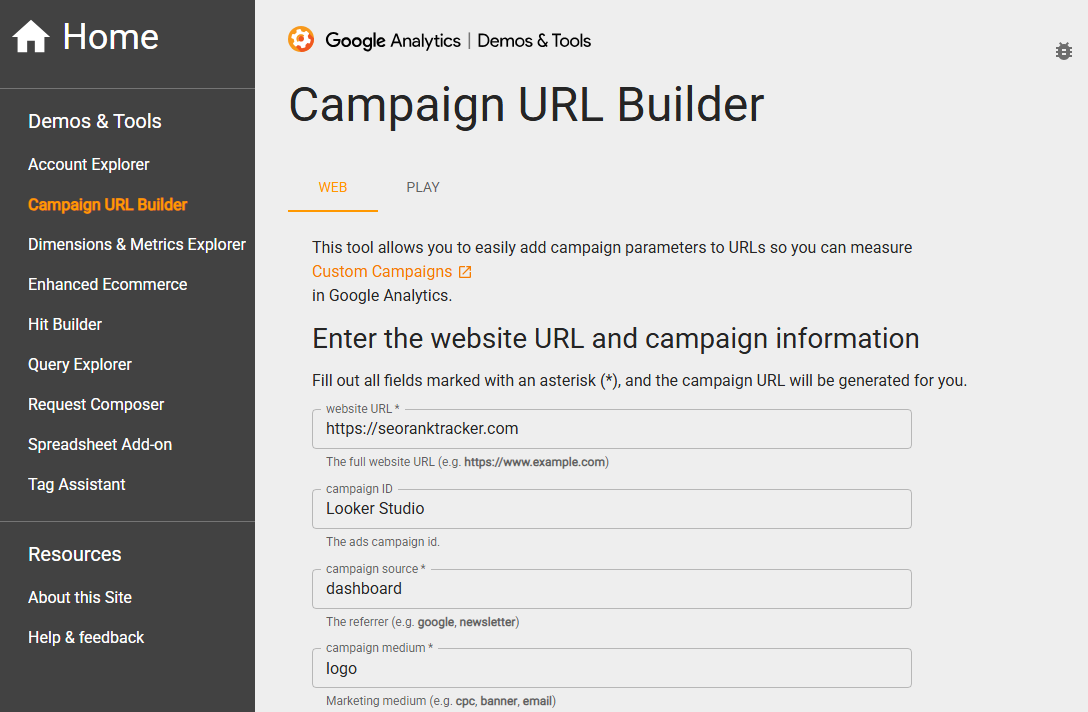
Steps:
- Enter your website URL
- Fill in the UTM parameters:
- Campaign Source (required)
- Campaign Medium (required)
- Campaign Name (required)
- Campaign Term (optional)
- Campaign Content (optional)
- Copy the generated UTM link
Manual Creation
Format: https://yourwebsite.com?utm_source=SOURCE&utm_medium=MEDIUM&utm_campaign=CAMPAIGN
Example process:
- Start with your URL:
https://mystore.com/products - Add
?then your first parameter:?utm_source=facebook - Add
&then additional parameters:&utm_medium=social&utm_campaign=summer_sale - Final result:
https://mystore.com/products?utm_source=facebook&utm_medium=social&utm_campaign=summer_sale
A step-by-step guide
So, we have our Looker Studio SEO Dashboard, which we offer for free. Since it does get used a lot, I’d like to know if it gets us any traffic on seoranktracker.com and (even better), which links perform better: the logo section, the copyright?
I’ll do it manually, so that it’s easier for us to understand the process:
URL: https://seoranktracker.com (In this specific campaign, we’ll get people on the homepage. If we’ll run various other promotions, we’ll use those URLs).
Next one: UTM_source: in this case ?utm_source=looker_studio
The traffic comes from our SEO dashboard, so I’ll use it as my UTM_medium, while UTM_campaign will be called “marketing_reports”.
I’ll also add UTM_content, to differentiate between the logo image and the copyright section.
https://seoranktracker.com/?utm_source=looker_studio&utm_medium=dashboard&utm_campaign=marketing_reports&utm_content=logoNow that I have my code, I’ll paste it on my Looker Studio dashboard.
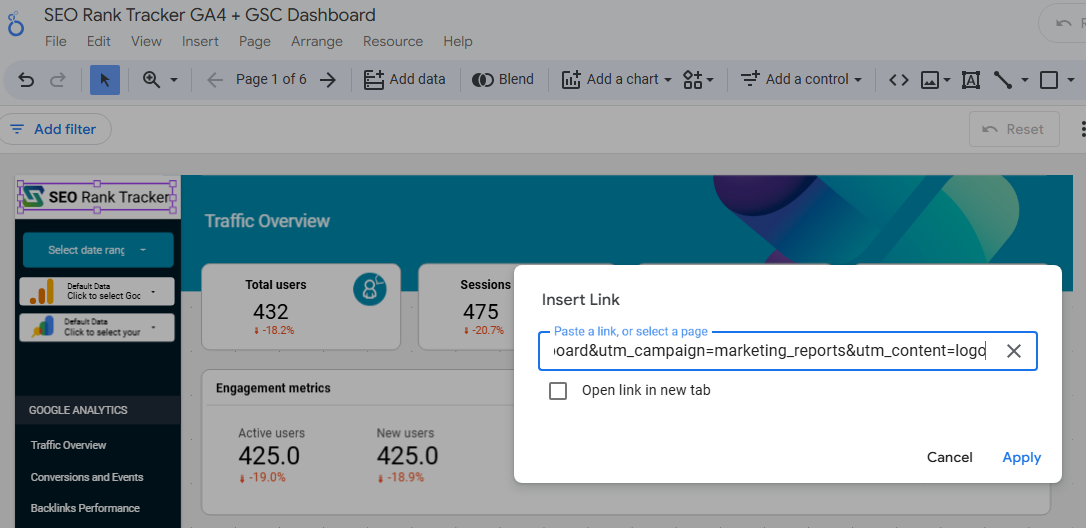
Your next question: OK, how to I see the traffic?
Go to REPORTS -> BUSINESS OBJECTIVES -> GENERATE LEADS -> USER ACQUISITION.
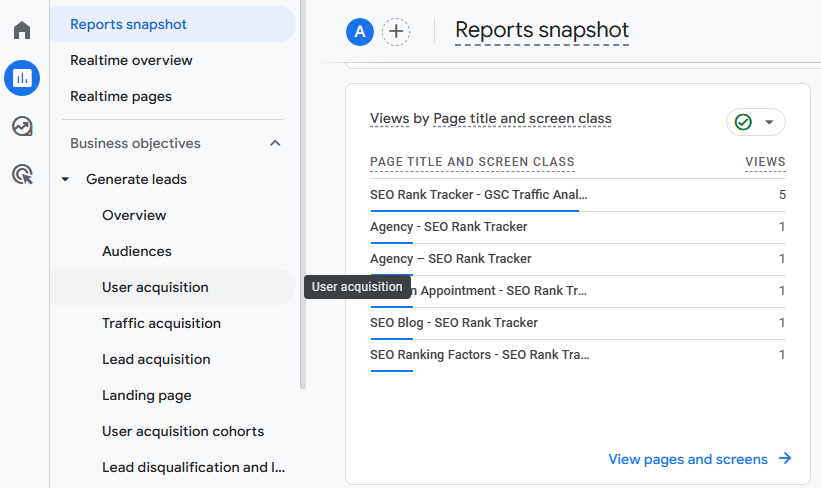
I’ll add new ones (from my email signatures, the Looker Studio footer link, new campaigns as we are building them).
Why do we need these UTM parameters?
UTM parameters are essential for understanding and optimizing your marketing efforts. Here’s why they’re so valuable:
1. Track marketing performance
Without UTMs, all your traffic looks the same in analytics. With UTMs, you can see:
- Which campaigns drive the most traffic
- Which channels convert best
- What content performs well
- ROI of different marketing efforts
2. Answer critical business questions
- “Is our email campaign working better than social media?”
- “Which Facebook ad creative gets more clicks?”
- “Are newsletter subscribers converting to customers?”
- “Should we invest more in Google Ads or LinkedIn?”
In my case it’s easy to handle the marketing work, as our team does everything: web design, SEO, email marketing, social media etc. I don’t need to worry about budgets, as I understand the value of each of these segments.
But for a small business, for instance, it makes sense to see if their Facebook ads are bringing in quality leads, if their SEO works (quick answer, it does ;)) etc. We had clients who tried various social media platforms and, by having all their UTM tracking codes in place, were able to ditch TikTok or Instagram for instance, to focus more on LinkedIn or Facebook.
Some even stopped PPC altogether, as it didn’t get any decent leads. Paying tens of thousands every month for the wrong potential clients didn’t make sense anymore.
3. Attribution and credit
- Without UTMs: All traffic might show as “direct” or get misattributed
- With UTMs: You know exactly where each visitor came from
4. Budget Optimization
- Identify your most profitable traffic sources
- Shift budget from low-performing to high-performing campaigns
- Stop wasting money on ineffective channels
5. Campaign Comparison
Compare performance across:
- Different platforms (Facebook vs. Instagram)
- Different ad formats (video vs. image)
- Different audiences (retargeting vs. cold traffic)
- Different time periods (Q1 vs. Q2 campaigns)
Real-World Example:
Without UTMs: “We got 1,000 website visits this month” With UTMs: “Facebook ads drove 400 visits with 50 conversions, email brought 300 visits with 75 conversions, and our Looker Studio dashboard sent 100 highly engaged visitors who spent 5 minutes on site”.
FAQ
Who detects these UTM parameters?
Analytics platforms detect UTM parameters, primarily:
- Google Analytics (most common)
- Adobe Analytics
- Facebook Pixel
- HubSpot
- Mixpanel
When someone clicks your UTM link, these tracking tools automatically capture and store the UTM data, then display it in your reports and dashboards for analysis.
Best practices for UTM tracking
Use consistent naming conventions (lowercase, underscores). Always include source, medium, campaign. Document your standards team-wide. Test links before launching. Track in spreadsheets. Use descriptive but concise names.
Avoid spaces/special characters. Don’t over-complicate. Use URL shorteners for sharing. Review and clean data regularly.
UTM tracking codes vs. event tracking
UTM codes track traffic sources – where visitors came from (campaigns, social media, emails). Applied to links before users arrive.
Event tracking monitors user actions on your site – clicks, downloads, video plays, form submissions. Tracks behavior after arrival.
Use together: UTMs show acquisition, events show engagement and conversions.
Bitly link vs. UTM tracking
Different purposes: Bitly shortens long URLs for cleaner sharing. UTM parameters track traffic sources and campaigns.
Use together: You can shorten UTM links with Bitly – the tracking data remains intact underneath the shortened URL.
Best practice: Create UTM link first, then shorten it with Bitly for social media posts.