How to Create a Topical Map for Your (SaaS) Website
The complete guide on how to manually research content and create a topical map for your website.

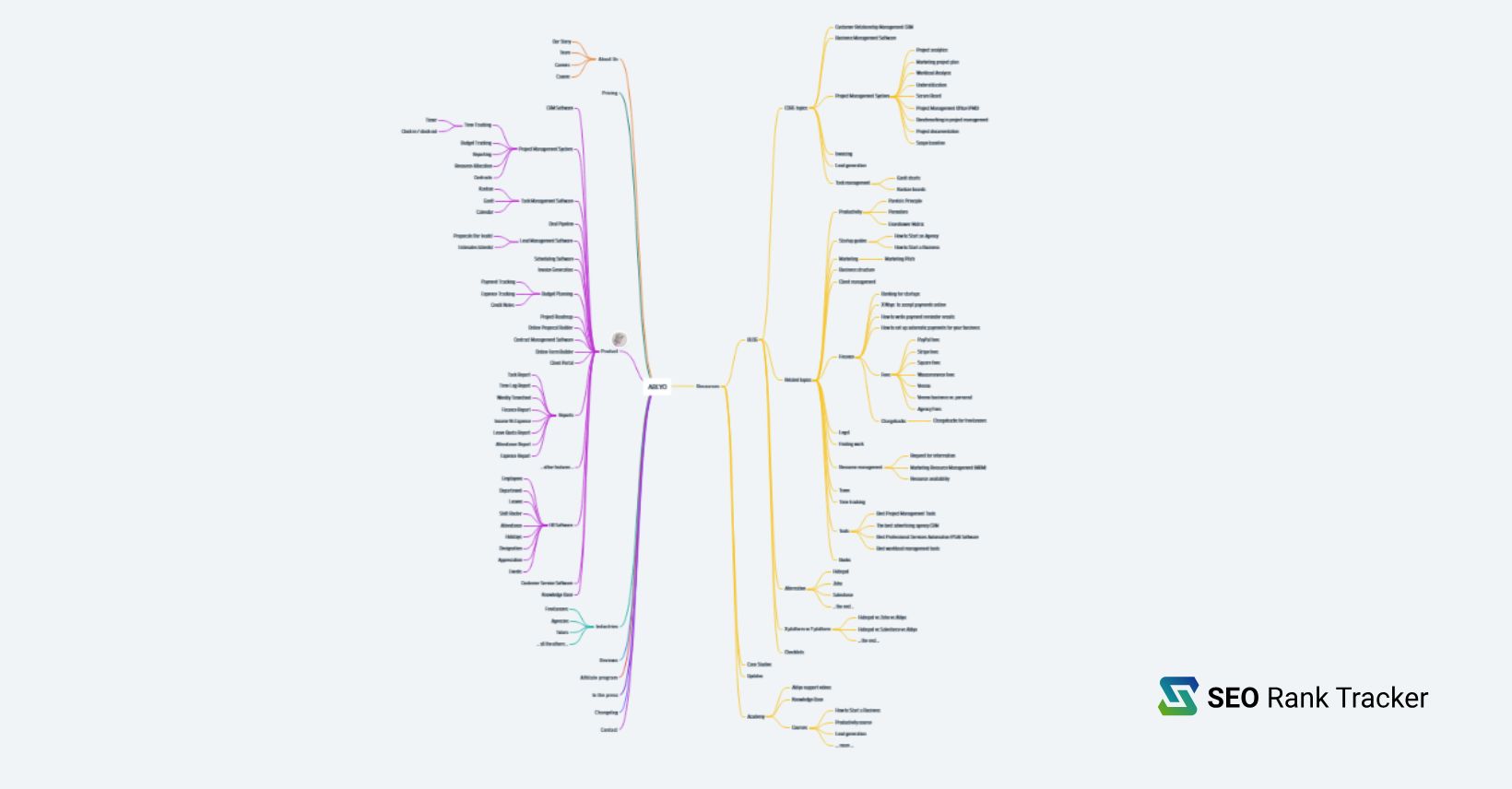
As Ablyo is finally getting ready to MVP, and after 5 years of working in the fintech SaaS niche, as a gift to you, I’m working on a big SaaS SEO Course for you to enjoy. Until then, one of the biggest SEO steps you need to take for your website: a PROPER topical map.
If you are not in these exact markets (fintect or SaaS), don’t worry, SEO is SEO afterall, so 99% of what I’ll humbly present here is valid for any website and business.
QUICK DISCLAIMER: I don’t write this with AI and I’m half-Romanian, so please bear with me, as I try to explain my strategies and even make you smile from time to time. It ain’t perfect, but it’s useful.
Table of Contents
What is a topical map and why do we even bother?
Ramona’s #1 rule of SEO: define what you’re writing about.
OK, it’s not really my rule, but a good thing to have in mind.
So.
A topical map is a strategic plan for organizing content around your main topic to build authority on that subject. It maps out how to cover your niche by creating a “pillar” pages for the main subjects and supporting “cluster” pages for related subtopics, with all pages interlinking to each other.
If it sounds too crazy, what we do is to create a MIND MAP in either Whimsical or Miro, map the main services / products and then sub-clusters with supporting content.
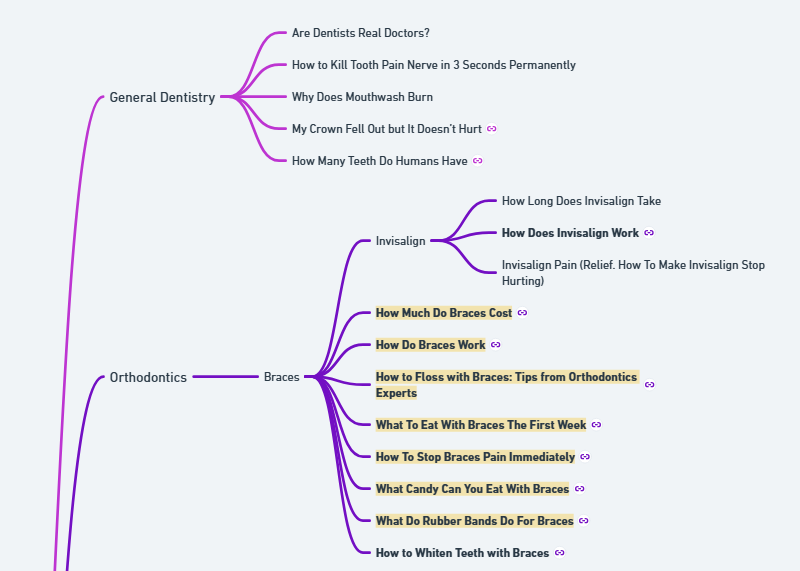
I know everyone and their dog just ask ChatGPT “write me a topical map for CRM” (for instance), but we’re not replacing thinking with AI here and I map my content manually every time. (Same with content briefs, I always perform the research manually).
Now it’s a standard for many SEO consultants, but it wasn’t always the case.
For years, writing was done in 2 ways: either too creatively by brand managers (so the company would never rank for what they were actually selling) or just hunting for super-low difficulty keywords (with a crapton of search volume).
Yeah, it was the Wild Wild West of SEO, when lawyers would have content about sexy Russians and doctors about .. don’t know .. you think about something crazy.
I kid you not.
Fortunately for us all, as Google got a tad smarter, we started seeing such crazy websites go back into the Dark Ages, while clients and SEOs alike moveds towards clustering content to gain something we call “topical relevance”.
Some even go as far as to name it “topical authority”, but the main idea is that your content should reflect what you’re selling.
With the exact words potential clients use!
Write about what you sell (exact terms clients search for)
Before I enter into the details of my topical mapping, let me tell you a stoy and why it’s important to include the words your potential clients use, when looking for what you sell.
Quite some years ago, I worked with a psychic reader. Amazing woman, we connected immediately as mothers and professionals. After redesigning her website, we ran into troubles: she wanted people to book her for Tarot and psychic reading, but refused to use these exact words on the website.
I can understand they seemed trivial (she didn’t want to get mixed with gypsies or low-quality mediums), but by not using these “keywords” she was hurting her chances to rank and get leads.
To give you a funnier example, imagine I wanted to get some work as a tennis coach (I’m certified and have done some work with local kids, including mine), but I’ll create a website and call myself … don’t know … racquet sport athletic consultant. Hmm? Sounds fancy enough?
Now good luck to me to getting leads, when people are searching for “tennis lessons” and “tennis coach near me“.
Ramona’s rule no. 2 in SEO: if ya ain’t writing about it, ya ain’t gonna rank for it.
One of my current clients is also a psychic medium (had at least 4 clients in this niche) and we are using the exact names of these services and she’s doing really well both in Google and AI searches.
We have worked in the personal finance niche a lot and the way you achieve topical relevance fast, is by planning your content well and using the entities you want to rank for.
How to build a comprehensive topical map for your website
I assume you already created your accounts on Whimsical, Miro or your mapping software of choice. You can also use a Google Doc (have done it in the past), but mapping apps kinda make it look prettier and it’s easy to drag-drop the elements from one section to another.
Don’t get hung up on making it perfect. Just like with website launches it’s better to have something decent up (and start ranking and even getting leads), than obsess for months over a font type or color.
Start with the basic pages and services / products
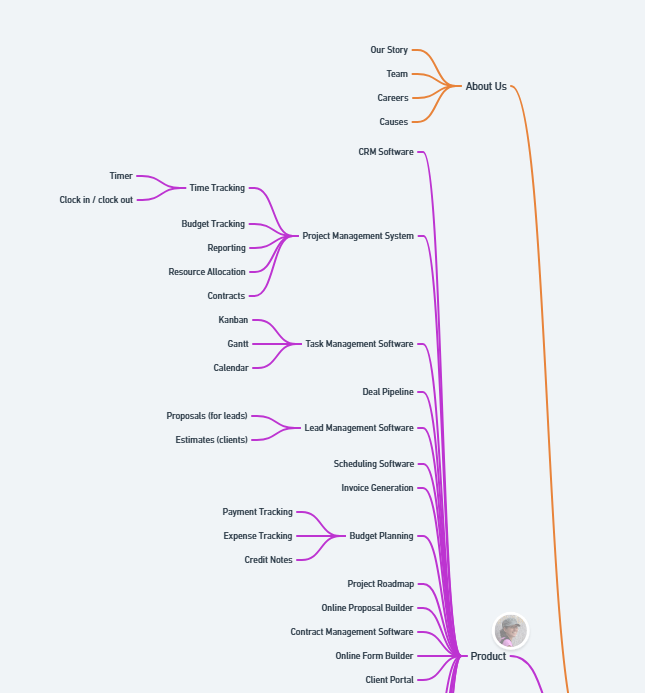
It’s only a partial view, I haven’t even finished mapping my initial content and the board is already getting huge.
Anyways, main pages for a SaaS:
- Homepage (of course) – hero section with main tag and USP, logos of clients / certifications, main features, benefits, each main feature presented quickly with a link to its dedicated page, testimonials spread out, latest blogs in the bottom section, newsletter signup (if applicable).
- Product page – many SaaS companies like to set the product/features only as a drop down menu and only have the separate features with their pages, for me it makes more sense to silo as ablyo.com/product/crm for instance. Either way works.
- Each product or feature with a dedicate page – as you can see on my mind map, for project management for instance I’ll add on the page details about time tracking, reporting etc.
- Pricing – explain each tier and show real pricing data. I know there are SaaS companies who like to hide prices, but, if you do want to show in AI as well, LLMs kinda like to know the correct info, and will prioritize sites that provide full disclosure.
- About us – mainly about the customer, not really you, but it’s usually the second page a visitor clicks on.
- Team – ideal for companies with a larger team, can be included as a section for one-person operations.
- Careers – probably not needed now, if you don’t hire at the moment, but important in time.
- Causes – I think everybody needs to be kind, so Ablyo will provide a free 1st tier subscription for all the users in my community and also parents or people who have Type 1 Diabetes. I’m the mother of a T1 and it’s hard. All other pricing plans will be 50%. Lifetime. You can donate to causes, you can provide free or reduced access, whatever you are comfortable with.
- Industries you serve – a main page with a list of your ideal niches and then separate pages for each (CRM for dentists, Time tracking for lawyers etc.)
- Affiliate / referral system – it’s an amazing idea to get new signups and also reward people who become brand ambasadors. You can provide free access in lieu of signups or (our way) a percentage of the sales.
- Customer stories, client spotlight, case studies – whatever you want to call it. List a few of your initial clients and how your app has changed their lives.
- Changelog – self-explanatory; list the improvements you have made to your software.
- In the press – a page to list your PR work, you can also have a separate blog category for press releases and easily query them into this page.
- Contact us – phone number (if applicable), support forms, links to Knowledge Base, physical address etc.
I know it’s a lot of work, so probably you won’t have the separate product pages from day 1 (even in my case we’re talking at least 15 extra pages), which need to be created based on screenshots, with details, optimized etc.
As a minimum, have about us, product features, contact us and the industries you serve, when you launch, and get your website developers to crank out the others as fast as possible.
Branch out to supporting content
Now this is tricky, since we have only 24 hours a day (and I sure hope you’re not working them all) and, unless you have 100 SEOs and writers cranking up high-quality content, you will need to prioritize your supporting content.
We are starting with guides on each of our MAIN features (CRM software, Invoice generator, project roadmap etc.).
Ablyo for instance handles HR tasks as well, there’s a payments feature in work at the moment, but we are not fully dedicated to Human Resources and far from being a payment management system. So I will focus my initial guides and writing towards our main features: project management, lead generation, productivity etc.
Here is where some SaaS companies (or websites in other niches) do it wrong, they branch out too soon with their content and it becomes less focused on their CORE offering. I won’t start posting about banking options for SMBs or how to hire a developer, until we get a constant stream of leads per our 3-4 most important features.
Of course, as I get the ideas, I will start mapping them, so that I always have something to look at, but the writing will be clustered until we reach topical relevance on what we sell.
What does this supporting content include?
- Complete guide on x product/feature – and I mean complete, not 500 words or some AI slop;
- The benefits of x product;
- How to do X with the product – show screenshots, go into details. The more people know how your product works, the bigger your chances for you to convert them into paying customers.
- Best tools for X feature – we call them listicles and they still work SHOCKINGLY well: Best CRM software for freelancers, Best time tracking app for roofers (whatever you sell and your ideal client). You’ll plop yourself first in the list and then mention some competitors. If you don’t believe me, here’s Glen Allsopp’s article: Do Self-Promotional “Best” Lists Boost ChatGPT Visibility? Study of 26,283 Source URLs
- Best alternative to x competitor – Best alternative to Xero, Best alternative to Zoho etc.
- VS posts – I’ve had crazy success with my fintech clients for such articles: Hubspot vs Zoho (then vs Ablyo in the main content). Hubspot vs Salesforce, the possibilities are endless here.
- Checklists, templates, cheatsheets, calculators – any industry has them. Prepare these resources (they are also very efficient lead magnets) and offer them for free.
- Best books – an untapped cluster by many SaaS companies: best books on productivity, best books on marketing, best books on leadership. Go one step further: place affiliate links on them and get some income.
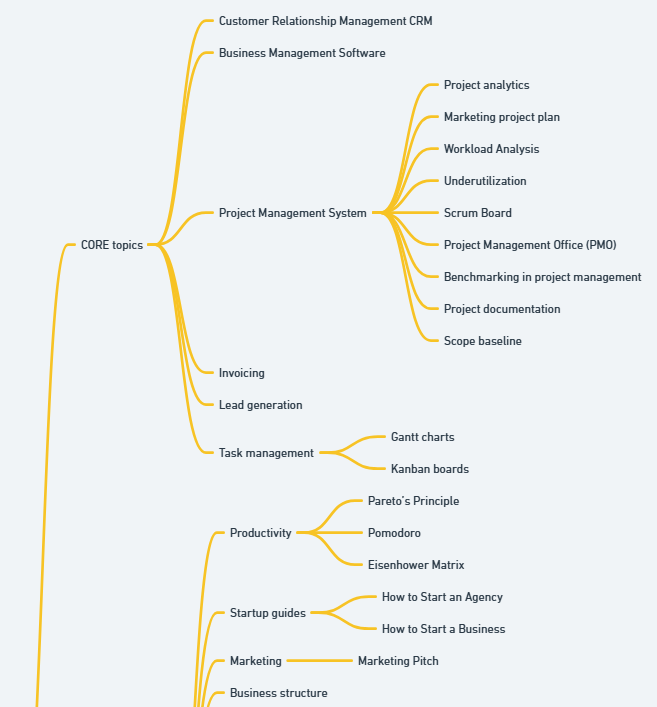
We have worked a lot already and are still just in the “core offering” stage with our content planning.
As soon as you are happy with this main structure, you can map out your secondary features (HR, payment processing, inventory management etc.) While we don’t develop this content yet on Ablyo (as the features are still under development), I like to map everything and the just bold the content I’ve written.
Extra content we’ll add: knowledge base (with snapshots and even videos), maybe video courses in an “academy” section, the possibilities are endless.
This gives me a precise view on what I have to work on and what’s been done. If you look at our featured image, the topical map is already pretty big and we haven’t even done the next step of finding ideas …
You can use this in other niches as well, pillar pages will allow for fast rankings and a better sales funnel. As an example, here is an oracle cards information hub, that will branch out into separate sub-topics: how to choose a deck, benefits, lists etc.
Peform a VERY thorough competitor content analysis
Woohoooo, no AI used but our own amazing brains! Take this Sudoku!
Good, we have a LOT of content ideas beautifully mapped out and we haven’t even looked at our competitors. OK, kidding aside, as an SaaS founder (or any business owner), I sure hope you know your market inside-out.
Just browse their websites
I know it’s easier to just export stuff or ask ChatGPT, but do me a fovor and manually research. As you add to your topical map, you can do another thing (copy some style elements you like, a new way they present features) on a “mood board”.
You might not be the main designer, like I have to be, but saving these snapshots helps a lot in future builds. We ain’t reinventing the wheel anyways, so good intel can be amazingly inspirational. For this I like to use Evernote, but you can use Notion or whatever makes sense.
What are their main pages? What are their main blog posts about? Any featured content?
If you haven’t mapped out those articles, add them to your evergrowing list.
Scan websites and sitemaps
As an SEO, I swear by Screaming Frog, but you don’t have to pay 300 bucks almost for a yearly subscription, if you don’t want to. Glen Allsopp (mentioned him already) has offered a nice FREE tool to scan websites (Detailed). While pretty sluggish on big websites, it can give you a good list of pages import to an excel sheet.
Another option: domain.com/sitemap.xml. Doesn’t work with any website, but 90% of the time you’ll get to something similar to this:
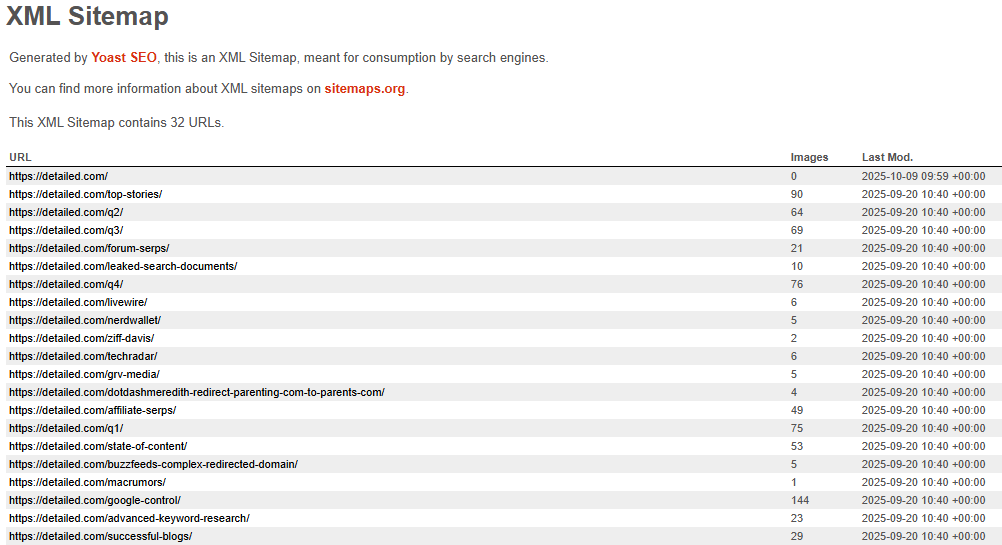
Copy-paste all in an Excel sheet. You can do this for all the websites in your market and then maybe ask ChatGPT or your AI of choice to remove duplicates. If not, just spend some time to read through these sitemaps and add to your map.
You don’t need a perfect list because: 1. it’s gonna have 5K items probably and become overwhelming and 2. you will develop new content as soon as you start ranking and have some initial traffic.
It makes more sense to cluster topics on what’s already getting traction, than go nuts and post unrelated content.
Competitor keywords
You’ll think I’ve lost my mind, as an SEO, to put this type of analysis so low on my priority list. The reason is that we’re not in 2010, to just aimlessly write and hope something sticks, but we are organizing our topical map on what we sell first and then on secondary topics.
Now it’s a good moment to head to Ahrefs, Semrush or any SEO tool of choice, plop your competitors’ website in and have 2 separate excel pages: top pages and top keywords.
Google’s autosuggest tool
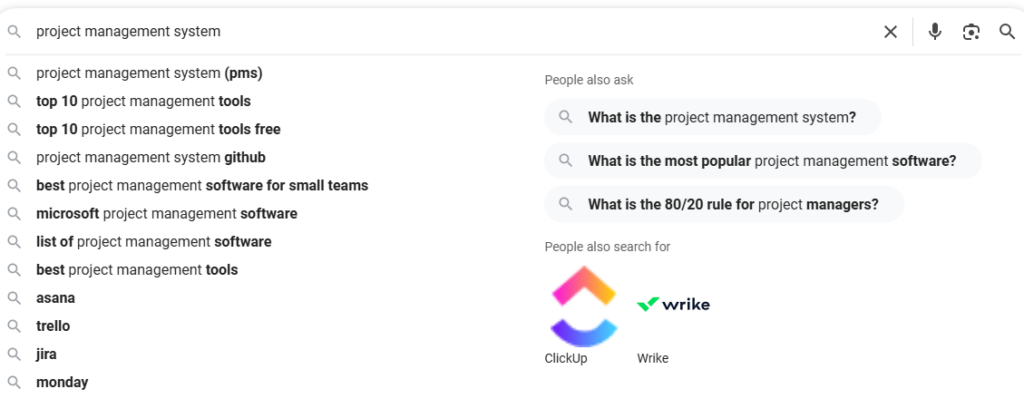
I just wrote project management system and I get so much value already. A list of the tools I’ll present in our “x vs y vs Ablyo” posts, “best of”, What is”, “How to”. And we have at least 13 separate features at the moment. If I perform the same search, we have at least 100 articles to publish. Yey!
Google’s Things to Know
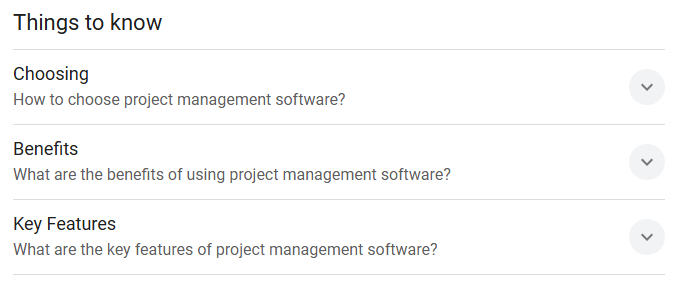
All these need to appear in your topical map. For each of your features or services.
Answer the Public
I won’t go and say Neil Patel ruined it, I view it after a few years and it’s pretty nifty.
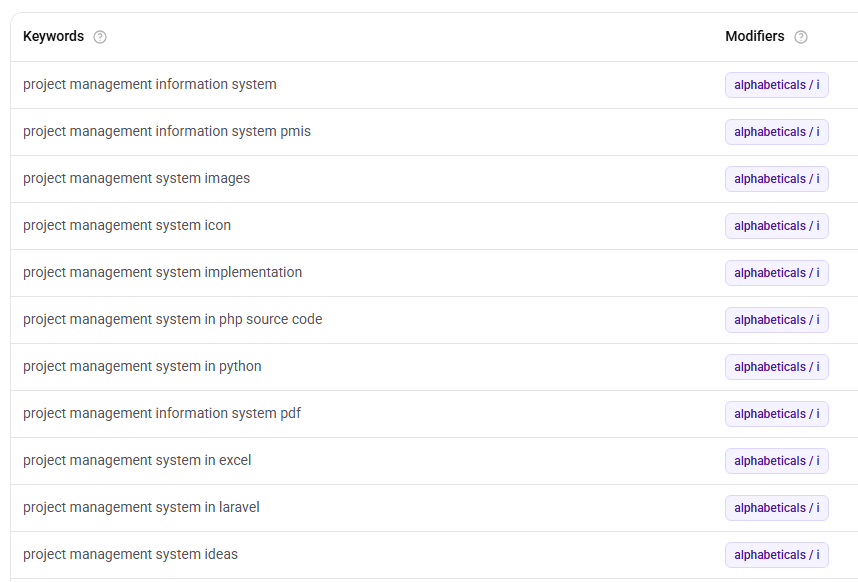
What a great list of extra articles and resources I can add to my website!
Reddit, Quora, forums
A great resource for informational content ideas: what are people asking about? What are their pain points? What do they hate in your competitors?
Specialized forums are a gold mine for “how to” posts and guides.
Google Search Console
If you are doing your homework well and posting high-quality content, in a few weeks you’ll get a beautiful list of keywords ranking in your GSC dashboard. Most of them should be based on what you already have as content, but you’d be amazed to see how many great topic ideas you can get from there.
Either beef up your ranking pages with these new keywords (if they support the core topic) or branch out in new blog posts if it makes sense.
This would be “in short” how to plan your topical map. Please share, if you find it useful and comment with your own ideas and advice.
If you’d like me to manage this process, feel free to order our Manual Topical Map Creation Service, for just $500.